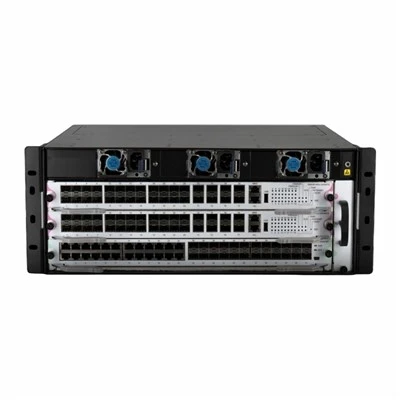

Ever wondered how your home or office WiFi just works seamlessly, even when you move around with your phone or laptop? Last week, I had a guy from a local café message me saying their free WiFi kept dropping when people were ordering food, and it made their reviews suck. Turns out, it wasn’t just too many devices—they were running random off-the-shelf routers all over the place with no central control. That’s where a WiFi Access Point Controller comes in, and today I’m breaking down exactly how these things work, straight from someone who’s been selling them for a few years now.
First, let’s start with the basics: you can’t talk about a WiFi controller without a quick shoutout to how individual APs work. Like, when your laptop connects to WiFi, it’s talking to a specific access point (AP) — that little box on the ceiling or wall that emits the signal. But a single AP only does so much: it handles connections for its immediate area, but if you have more than, say, 10 or 15 devices, or multiple APs spread across a big space (like a coffee shop with 3 floors, or a retail store with 20 checkout lanes), those individual APs start fighting with each other. They might broadcast on the same channel, overlap signals, and drop connections when someone roams from one AP to the next. That’s where a controller steps in to fix all that.
Wait, let’s make that concrete. I had a client last year who ran a 10,000 sq ft gym. They initially installed 8 standalone APs, and half the members complained about lag during their HIIT classes, plus the staff couldn’t run their point-of-sale tablets without dropping mid-transaction. We swapped them for managed APs hooked up to a WiFi Access Point Controller, and the difference was night and day. But before we jump into how the controller does its magic, let’s clarify: a WiFi controller isn’t some mysterious black box—it’s a piece of hardware (or sometimes software running on a server) that manages a whole fleet of wireless APs, instead of each AP operating independently. If you want a deeper dive on the building blocks of wireless network gear, check out this guide on A Wireless Network Interface Controller to get the lowdown on the hardware that talks to your devices.
Okay, so how does the actual control work? Let’s break it down step by step, like I’m explaining it to my cousin who fixes office computers. First, the controller has to “discover” all the APs it’s gonna manage. When you plug in a new AP, it’s set to a default state where it’s looking for a controller on the network. The controller uses a few tricks here: it might send out a broadcast message (like a loud “hey, I’m the controller!”) that all APs on the same LAN pick up, or you can manually tell the AP the controller’s IP address if they’re on separate subnets. Once the AP hears that, it checks if it’s allowed to connect—usually via a simple security key or certificate to keep random APs from crashing your network. That’s the first handshake, no big deal, right?
Next up, the controller takes over all the boring, repetitive setup that you’d have to do on every single AP if you were using standalone ones. Like, if you want your network to have one WiFi name (SSID) for guests and another for employees, you only set that up once on the controller. It pushes that exact same config to every AP connected to it—so you don’t have to log into 20 different router boxes and click “save” 20 times. That’s a huge time-saver for anyone managing a big network. Plus, if you ever need to update the APs’ firmware (the software that runs them), you don’t have to go to each AP and plug in a USB stick or log into its web interface. You just push the firmware update from the controller, and it installs on all APs automatically. I’ve had clients with 50+ APs cut their firmware update time from 8 hours to 15 minutes—game changer.
But here’s where the controller really earns its keep: dynamic channel assignment (DCA) and transmit power control (TPC). Let’s start with DCA. All WiFi works on channels—like 2.4GHz has 11 channels, 5GHz has way more, and if two APs are on the same or overlapping channels, their signals interfere with each other, causing lag and drops. The controller constantly monitors every AP’s signal strength, noise levels, and what channels they’re using. Every few minutes, it runs an algorithm that tweaks each AP’s channel to avoid overlap. For example, if AP 1 is on channel 1 and AP 2 (10 feet away) was on channel 6, the controller might move AP 2 to channel 3 so they don’t step on each other’s toes.
Then there’s TPC. Each AP broadcasts at a certain power level—too high, and it bleeds into areas where there’s no one using WiFi, wasting power and causing interference; too low, and people at the edge of the AP’s range get bad signal. The controller measures how far away each connected device is from each AP, plus how much signal is needed for a stable connection, and adjusts the AP’s power level automatically. Last month, a school client called me because their gym APs were blasting too much power into the library next door, making study kids mad. We logged into the controller, and sure enough, it adjusted each gym AP’s power down just enough to stop the bleed, no reconfiguration needed.
Another big one is seamless roaming. Ever been at a coffee shop and had your Zoom call drop when you walk from the front counter to the back corner? That’s because your laptop was trying to connect to a new AP that’s actually stronger, but it takes a second to switch over—and during that split second, the connection drops. With a controller, it manages that handoff smoothly. It constantly sends probes to every connected device, checking which nearby APs have a stronger signal. When it’s time to switch, it tells the old AP to let go of the device, and the new AP to take over—all in less than 100 milliseconds, which is faster than you can blink. I tested this at a trade show last year, walking around with my laptop streaming a movie; no drops, no pauses, even when I passed 15 different APs. That’s the kind of stuff that makes or breaks a business WiFi network.
Wait, let’s not forget security. A big selling point for controllers is that they centralize security, which is way better than managing it on each AP. You can set up rules like “guest WiFi can’t access the internal office network,” or “only employee devices with a specific certificate can connect to the internal SSID” all on the controller. It can also do things like detect when a rogue AP (a random router someone plugged in that’s not part of your network) pops up, and shut it down automatically. I had a small office client a while back where an intern plugged in their personal router to use their own printer, and the controller caught it in 2 minutes, disconnected it, and sent an alert to the admin. That’s the kind of security that standalone APs can’t offer—they don’t have the big-picture view to spot weird stuff.


Now, let’s talk about the different types of controllers, because not all are the same. Some are hardware-based—they’re a physical box you rack in your server closet, good for big networks (50+ APs, like a hospital or university). Others are software-based, which run on a regular server or even in the cloud, perfect for small to medium businesses (10-50 APs, like a retail chain or a chain of coffee shops). The cloud-based ones are super popular right now because you can manage them from anywhere—if you’re traveling for work, you can log into the controller’s web dashboard and adjust settings, no need to be in the office.
But wait, I should be real with you—controllers aren’t for everyone. If you just have a home network with 1-2 APs and 10 devices, you don’t need one. A standalone router works fine. But when you get to 3+ APs or more than 20 devices at once, the headaches add up fast, and a controller becomes worth every penny. I tell my clients: if you’re spending more than 2 hours a month troubleshooting WiFi issues, a controller will pay for itself in a month.
Let’s circle back to that café client I mentioned at the start. They had 4 standalone APs across their 2-story shop, and their manager was spending 3 hours every week resetting routers because people kept complaining about drops. We installed 4 managed APs hooked up to a WiFi Access Point Controller (I linked the exact page for our models here if you wanna check), and that’s cut their WiFi support time down to 15 minutes a month. Their Google reviews for WiFi went from 3.2 stars to 4.7, and their online order numbers went up because people could pay with their phones without dropping. That’s the kind of real win that makes me love this job.
If you’re running a business and starting to notice WiFi lag, drops, or interference, you know it’s not a small problem—it affects your customers, your staff, your sales, and your reputation. A WiFi Access Point Controller isn’t just a piece of hardware; it’s the nerve center of your wireless network, making sure every AP works together smoothly, securely, and efficiently. If you’re tired of dealing with messy, disjointed WiFi and want a solution that actually works, reach out to our team to talk through your specific needs. We’ve helped everyone from small cafes to big hospitals get their WiFi under control, and we can help you too.
References
- Cisco Meraki. (n.d.). Wireless Access Point Controllers: What They Are and How They Work. Retrieved from industry whitepaper archives
- IEEE 802.11-2020 Standard. (2020). Wireless LAN Medium Access Control (MAC) and Physical Layer (PHY) Specifications. Institute of Electrical and Electronics Engineers
- Extreme Networks. (n.d.). Seamless Roaming in Enterprise WiFi Networks. Technical brief on wireless mobility management
- Aruba Networks. (2021). Dynamic Channel Assignment and Power Control for High-Density Wireless Environments. Product implementation guide