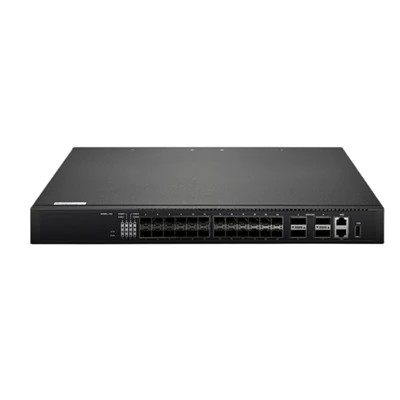

Hey there, if you’ve been in the market for a managed PoE switch, you’ve probably stumbled across the Poe Switch 24 Port Managed and wondered, “What makes its management interfaces stand out?” As someone who’s been supplying network gear for years, I get it—you don’t just buy a switch for the ports; you need to control it, tweak settings, and troubleshoot without pulling your hair out. Today, I’m breaking down exactly what management interfaces this 24-port managed PoE switch has, why each matters, and how it fits into your network setup. Let’s dive in.
First off, let’s set the stage: a lot of small to mid-sized businesses, office buildings, or even campuses lean on a 24-port PoE switch because it hits that sweet spot between density and power. The managed part is key here—you can’t tweak a regular unmanaged switch, so the interfaces that let you access and configure it are make-or-break. No one wants to fumble with clunky tools when a quick interface tweak would fix their IoT devices or security cameras.
Let’s start with the bread and butter for most IT folks: the web-based interface. This is probably the first thing you’ll use when you unbox the switch and plug it in. Why? It’s visual, no weird command lines to memorize, and you can do everything from assigning VLANs to checking PoE power usage in a couple clicks. I’ve seen so many admins who started with the CLI but switched to the web UI for day-to-day management because it’s less error-prone. The Poe Switch 24 Port Managed’s web interface lets you see real-time stats per port, like how much power a wireless access point is pulling or if a security camera is dropping packets. It also has a drag-and-drop setup for QoS rules—super helpful if you’re running video conferencing or VoIP calls that need priority. Pro tip: if you’re scaling up, pairing this with a Switch 48 Ports Manageable makes sense, but the 24-port’s web UI is simpler for smaller teams.
Next up, the Command-Line Interface (CLI). Yeah, I know—some people groan when they hear CLI, but hear me out. For advanced configurations or bulk changes, it’s way faster than clicking through web pages. The Poe Switch 24 Port Managed has a full-featured CLI, accessible through both a console cable and SSH. The console is your fallback if the web UI goes down for some reason (power glitch, network misconfiguration that locks you out), and SSH is for remote access without being physically at the switch. You can run scripts to configure all 24 ports at once, set up spanning tree protocols to prevent network loops, or even debug PoE faults. I recommend using SSH over the web UI for remote sessions because it’s encrypted—no one can snoop on your credentials. If you’re moving toward a more complex network, this CLI pairs nicely with gear like a 10 Gbe Poe Switch for high-speed backhauls, but this 24-port switch’s CLI is robust enough for most small to medium networks.


Then there’s out-of-band management, which is a lifesaver when your main network is down. OOB management is basically a separate interface that works even if the switch’s data ports aren’t routing traffic. The Poe Switch 24 Port Managed has a dedicated OOB Ethernet port—you can plug your laptop or a management PC into it, no matter what’s happening with the 24 PoE ports. This is crucial for network admins who need to fix a switch that’s acting wonky but can’t reach it through the regular network. I’ve had clients call me at 2 a.m. because their cameras went down, and OOB management let them log in and reset a port without driving to the site. It’s a small feature, but it’s a game-changer for uptime.
Let’s not forget SNMP (Simple Network Management Protocol). If you’re using a network monitoring tool, SNMP is how your server sees all the switch’s data—port status, power usage, temperature, even fan speeds. The Poe Switch 24 Port Managed supports SNMPv1, v2c, and v3. V3 is the most secure, so I always tell customers to use that instead of the older versions to prevent unauthorized access. A lot of our clients use this with their existing monitoring software to get alerts if a PoE port is drawing too much power (which can overheat the switch) or if a port has been disconnected unexpectedly. If you’re building a larger network that needs to aggregate traffic, this SNMP support plays well with a Network Aggregation Switch to keep everything visible in one dashboard.
Another interface that’s super useful is REST API. Yeah, it’s a bit more technical, but if you’re automating network tasks (like using Ansible or Python scripts to configure switches), the REST API lets you do that without clicking or typing in CLI commands. The Poe Switch 24 Port Managed has a well-documented REST API, so you can build scripts to automatically provision new devices—like when you add a new wireless AP to the office, the script can set up its VLAN and PoE power limit in seconds. This is huge for businesses that want to reduce manual work and avoid human error. If you’re running a carrier-grade network, this API works alongside a Carrier Ethernet Switch to manage hundreds of devices across locations, but even for a single office, it saves time when you need to deploy multiple switches.
Wait, should I mention the console port? I know I touched on it with CLI, but it’s worth a separate note because it’s the ultimate fallback. The Poe Switch 24 Port Managed has a RJ45 console port (or sometimes a mini USB, depending on the model) that you can connect to a laptop’s serial port (or with a simple adapter) to access the CLI directly. You don’t need a network connection at all—if the switch is plugged into power, you can get in. I always keep a console cable in my tool bag for every site visit, and it’s saved me more times than I can count when a switch has a weird network crash and no other management interfaces work.
Let’s talk about real-world use cases, because that’s where these interfaces shine. Take a retail store: they need 24 PoE ports for security cameras, POS terminals, and Wi-Fi. The web UI is perfect for their part-time IT guy, who can check if a camera is offline with a few clicks. If the Wi-Fi cuts out, he can SSH into the switch through the CLI to reset the VLAN for the access points without calling an expensive tech. For a small manufacturing plant, they might use SNMP to monitor power usage on their industrial IoT sensors—if a sensor starts drawing too much power, they get an alert before it causes a outage. The OOB port is key here because if the main network goes down, the maintenance team can still log in and fix the switch.
Now, let’s compare this to other switches, just to give you context. A lot of unmanaged switches don’t have any of these interfaces—you plug them in and they work, no control. Basic managed switches might have a web UI and CLI, but skip OOB or REST API. The Poe Switch 24 Port Managed we supply has all of these, which is why it’s popular with clients who want flexibility without overpaying for a 48-port model. Speaking of which, if you outgrow 24 ports, you can easily expand with a Switch 48 Ports Manageable—they have the same management interfaces, so your team doesn’t have to learn new tools.
Wait, what about security? I know that’s a big concern for everyone. The management interfaces on this switch are locked down by default—you need to set a strong password, and you can restrict access to specific IP addresses so only your management PCs can log in. The web UI uses HTTPS, CLI uses SSH, SNMPv3 uses encryption, and the REST API uses OAuth2.0 for authentication. No matter which interface you use, you’re not leaving your network open to random people. I always tell customers to change the default credentials right away—this is basic, but you’d be surprised how many people skip it and get hacked.
Another thing: firmware updates. All these interfaces let you update the switch’s firmware, which is important for security patches and new features. You can do it through the web UI in a few clicks, via CLI with a TFTP command, or even through the REST API if you’re automating updates. The Poe Switch 24 Port Managed checks for updates periodically (you can set it to auto-check) and sends you an alert if there’s a critical update—super convenient.
Let me get back to why this matters for you. If you’re a small business owner or IT manager, you don’t want to deal with a switch that limits what you can do. The management interfaces here give you control, flexibility, and uptime without the complexity of high-end enterprise switches. I’ve worked with clients who tried cheaper switches that only had a web UI, and when they had a network crash, they couldn’t access the switch because the web UI required a working network. OOB management solves that. Others tried switches with bad CLI documentation, and they spent hours trying to figure out how to set up VLANs. The CLI on our Poe Switch 24 Port Managed is well-documented, and we send each customer a guide with common commands to make it easier.
If you’re reading this and thinking, “This sounds like exactly what I need,” I don’t want you to guess or waste time. You can reach out to us for a demo or more info on how the Poe Switch 24 Port Managed’s management interfaces fit your specific network needs. We’ve helped hundreds of clients set up these switches for offices, retail, manufacturing, and more, and we know exactly how to tailor the setup to your use case. Don’t settle for a switch that’s hard to manage—get the control you need with a switch that works as hard as you do.
Wait, one last thing: I should mention that if you need higher speed uplinks, pairing this 24-port PoE switch with a 10 Gbe Poe Switch gives you the bandwidth for high-demand devices like 4K cameras or Wi-Fi 6 access points. Or if you’re building a larger network, combining it with a Network Aggregation Switch lets you centralize management across multiple switches. And if you need something for a telecom or large business, a Carrier Ethernet Switch would scale, but this 24-port model is perfect for smaller to mid-sized environments that need robust management.
Look, at the end of the day, the best switch isn’t just about how many ports it has—it’s about how easy it is to manage when things go right and when they go wrong. The Poe Switch 24 Port Managed’s management interfaces check every box: web UI for simplicity, CLI for advanced tasks, OOB for emergencies, SNMP for monitoring, and REST API for automation. We supply these switches with full support, so if you have questions about setting up any of these interfaces, our team is here to help. Don’t hesitate to reach out if you’re ready to take control of your network—we’d love to help you find the right setup for your needs.
References:
- Network Switch Management Interfaces: A Comprehensive Guide, Network World, 2023
- Best Practices for Securing Managed Switch Interfaces, Cisco Systems, 2022
- Scalable Network Design for Small to Mid-Sized Businesses, Small Business Technology Council, 2023
- REST API Integration for Network Automation, Dev Central, 2022